Exhibitor information
Key contacts
Events team:
The events team are here to help you with all your registrations, exhibition, sponsorship and event related queries.
T: 1300 222 721
E: [email protected]
Exhibition and furniture hire
Exponet will be the official exhibition stand builders for the National Conference. Furniture, signage and other stand requirements may be booked through their dedicated portal.
Ketan Naran
T: [email protected]
E: 02 9645 7000
.
Exhibition booking registrations:
- Two complimentary registrations per trade booth.
- Each registration includes a ticket to the welcome reception, networking drinks, conference dinner, conference speaking sessions, entry to the trade exhibition and day catering.
Sponsor bookings:
Refer to your booking confirmation email or booking portal (link available through confirmation email).
Registering your attendees:
- Refer to your sponsor/trade inclusion email for your unique booking portal link.
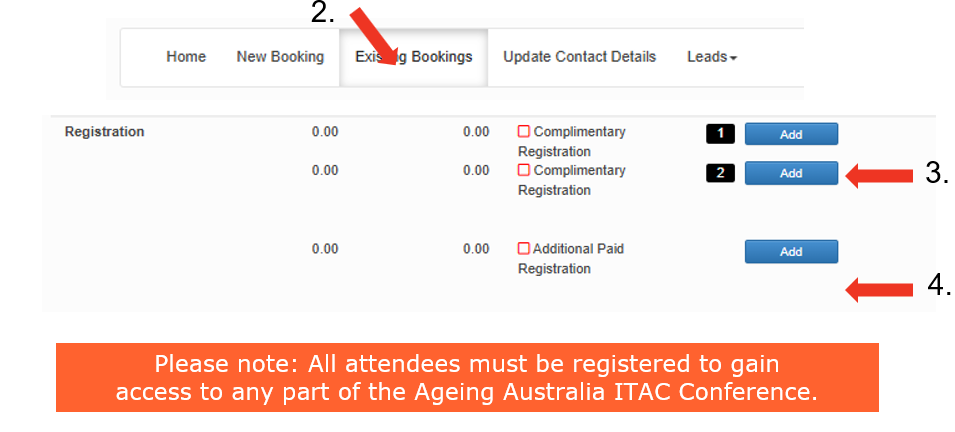
- Navigate to existing bookings tab.
- Scroll to the bottom of the page and click on add to complete the complimentary registrations.
- Additional registrations can also be purchased within the portal.
Additional exhibitor registration prices
- Full registration: $580
- One day registration: $330
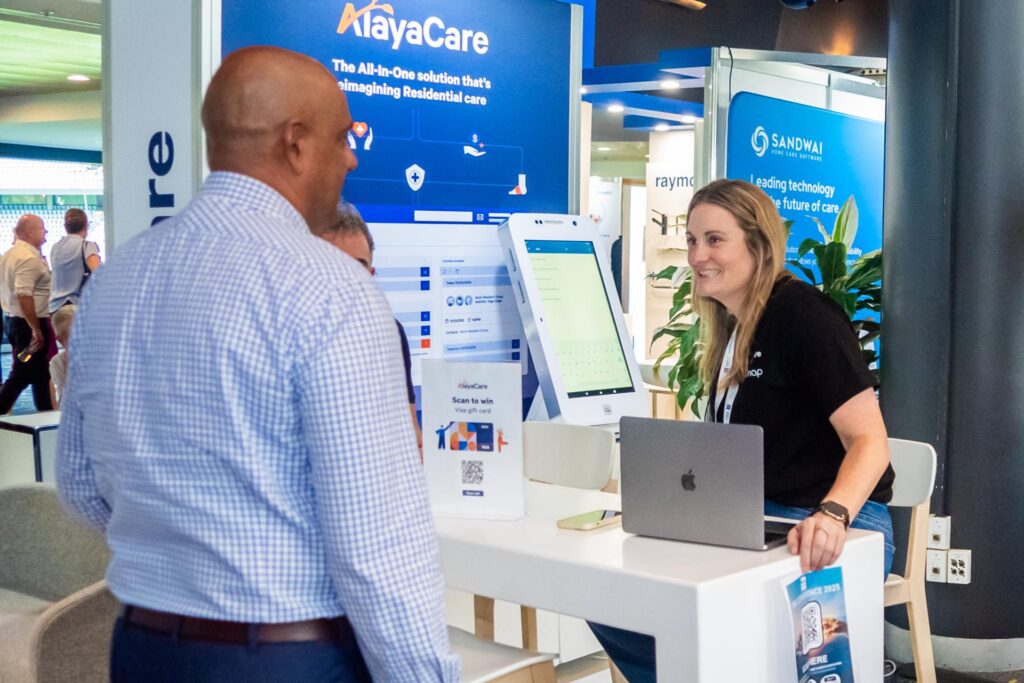
The conference app is your essential tool for connecting and engaging with attendees throughout the event. Use it to view the program, explore exhibitor profiles and network with delegates in real time. Importantly, the app also includes lead capture functionality allowing you to easily collect and manage contact details for people who visit your stand or attend your sessions. Your personalised login information will be emailed to a few days prior to the conference, along with instructions on how to access and make the most of these features.
- Conference app lead generation tool:
Use this feature each time you connect with someone in the app, and don’t forget to ask them to double-check that their privacy settings have been updated (under profile settings).
- View leads:
You will be able to view and export your leads anytime within the booking portal under the ‘Leads – View leads’ tab. You can learn more about setting up lead management on page 12.
- Gamification:
To encourage delegates to visit and engage with all sponsors and exhibitors, we’ll be running an e-passport style game through the conference app. Each exhibitor stand will display a QR code that delegates can scan to collect points.
The conference app includes built‑in lead management tools designed specifically for sponsors and exhibitors. By scanning delegate QR codes at your stand, you can quickly capture contact details and add notes or tags to help qualify each lead. All collected leads are stored in your app profile and can be exported to an Excel file at any time, making follow‑up fast and organised after the event. This streamlined process helps you track conversations, prioritise prospects and maximise the value of every interaction during the conference.
Questions
Within the conference app, you can add custom questions for delegates to answer when they scan your QR code at your stand. This helps you qualify leads on the spot — for example, by asking about their role, interests or purchasing needs making post‑event follow‑up more targeted and effective.
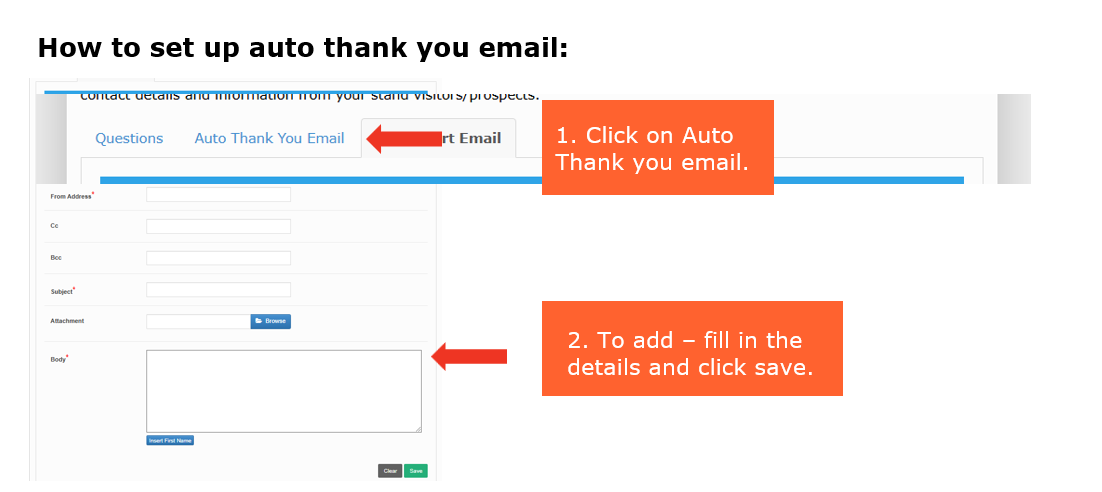
Auto thank you email
After delegates scan your QR code, the app can automatically send them a branded thank you email. This quick follow‑up helps reinforce your connection, share key information about your products or services and keep your organisation top of mind after the event.
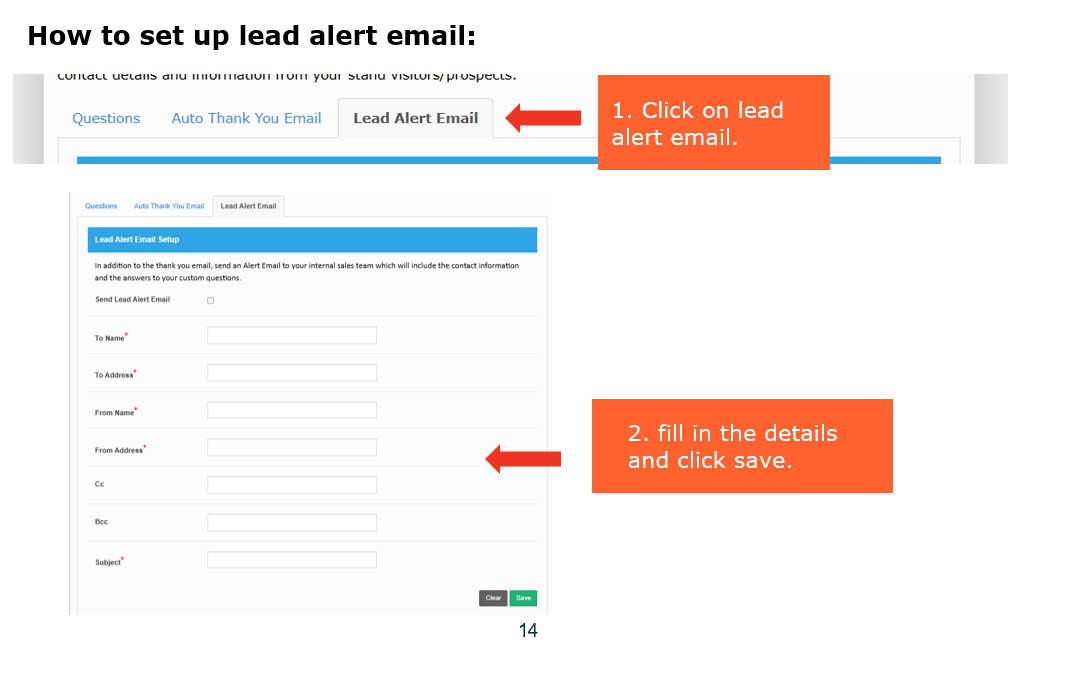
Lead alert email
Each time someone scans your QR code, you can receive an instant lead alert email. This notification keeps your team updated in real time, helping you track engagement during the event and prioritise hot leads quickly.
How to set up questions:
- Refer to your sponsor/trade inclusion email for your unique link to the booking portal.
- Click on leads – Setup.
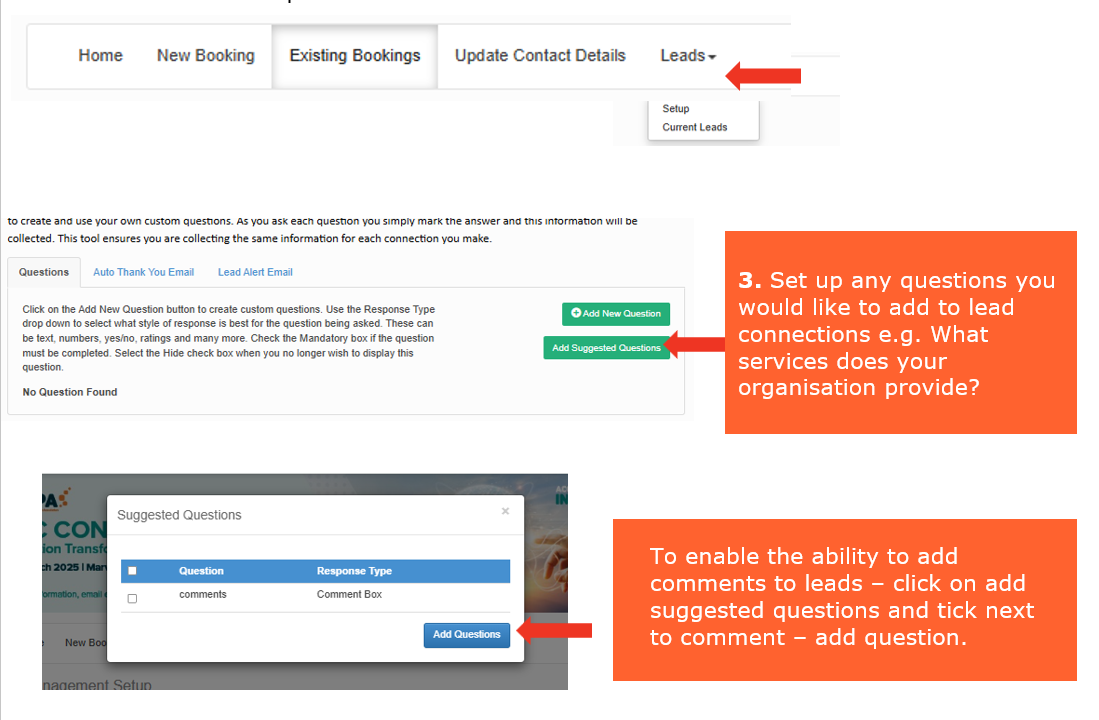
The conference app includes built‑in lead management tools designed specifically for sponsors and exhibitors. By scanning delegate QR codes at your stand, you can quickly capture contact details and add notes or tags to help qualify each lead. All collected leads are stored in your app profile and can be exported to an Excel file at any time, making follow‑up fast and organised after the event. This streamlined process helps you track conversations, prioritise prospects and maximise the value of every interaction during the conference.
Questions
Within the conference app, you can add custom questions for delegates to answer when they scan your QR code at your stand. This helps you qualify leads on the spot — for example, by asking about their role, interests or purchasing needs making post‑event follow‑up more targeted and effective.
Auto thank you email
After delegates scan your QR code, the app can automatically send them a branded thank you email. This quick follow‑up helps reinforce your connection, share key information about your products or services and keep your organisation top of mind after the event.
Lead alert email
Each time someone scans your QR code, you can receive an instant lead alert email. This notification keeps your team updated in real time, helping you track engagement during the event and prioritise hot leads quickly.
How to set up questions:
- Refer to your sponsor/trade inclusion email for your unique link to the booking portal.
- Click on leads – Setup.
The conference app includes built‑in lead management tools designed specifically for sponsors and exhibitors. By scanning delegate QR codes at your stand, you can quickly capture contact details and add notes or tags to help qualify each lead. All collected leads are stored in your app profile and can be exported to an Excel file at any time, making follow‑up fast and organised after the event. This streamlined process helps you track conversations, prioritise prospects and maximise the value of every interaction during the conference.
Questions
Within the conference app, you can add custom questions for delegates to answer when they scan your QR code at your stand. This helps you qualify leads on the spot — for example, by asking about their role, interests or purchasing needs making post‑event follow‑up more targeted and effective.
Auto thank you email
After delegates scan your QR code, the app can automatically send them a branded thank you email. This quick follow‑up helps reinforce your connection, share key information about your products or services and keep your organisation top of mind after the event.
Lead alert email
Each time someone scans your QR code, you can receive an instant lead alert email. This notification keeps your team updated in real time, helping you track engagement during the event and prioritise hot leads quickly.
How to set up questions:
- Refer to your sponsor/trade inclusion email for your unique link to the booking portal.
- Click on leads – Setup.
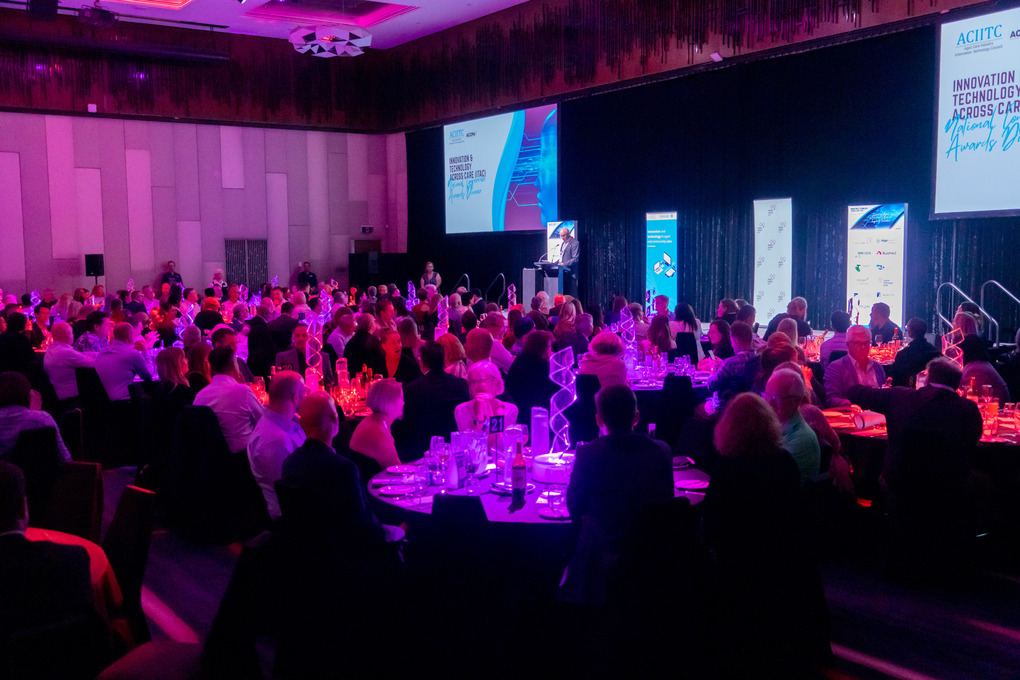
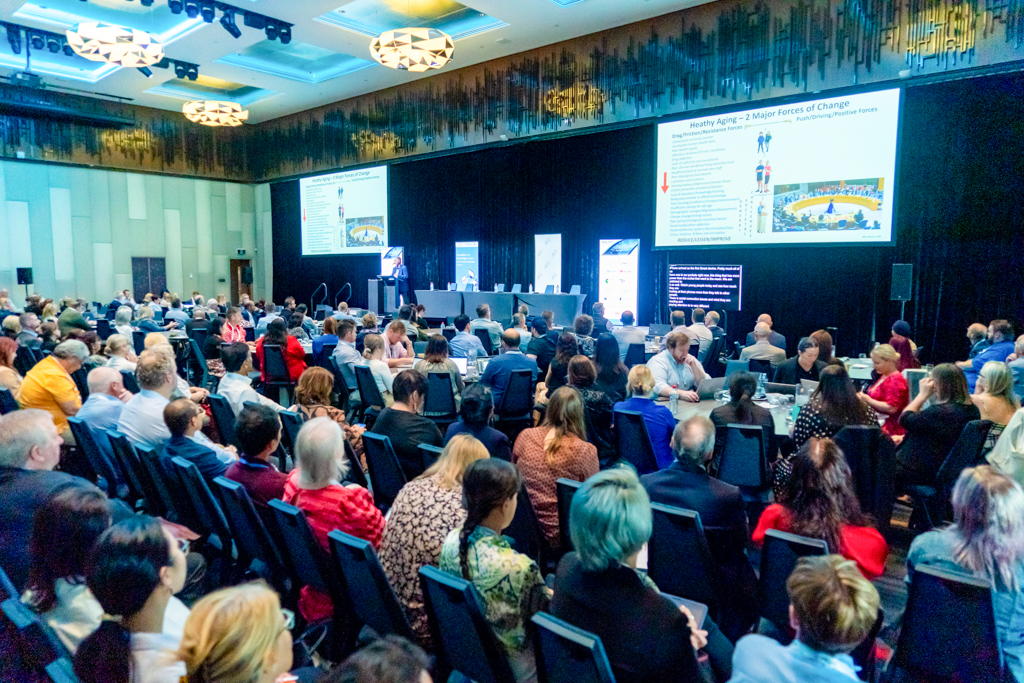
The ITAC Conference is happening on 6 and 7 May 2026 at the Royal International Convention Centre (Royal ICC). It will bring together leaders, innovators and practitioners from across the country, showcasing the latest digital solutions, data insights, and practical applications driving improved outcomes for older Australians.
Across two days of presentations, exhibitions, and networking, the conference provides a platform to share ideas, inspire innovation, and strengthen collaboration across the aged care technology landscape.

Draft schedule
Tuesday 5 May 2026
- Registration open - 1pm
- Bump in - 2pm
- Registration open 1pm-5pm
Wednesday 6 May 2026
- 8am-5pm Registration open
- 8am- 4pm Trade exhibition open
- 9am-5pm speaking sessions
- 10am - Morning tea exhibitors
- 10.30am - Morning tea delegates
- 12pm - Lunch exhibitors
- 12.30pm Lunch delegates
- 3pm- afternoon tea exhibitors
- 3.30pm afternoon tea delegates
- 6.30pm-11pm ITAC Awards Dinner
Thursday 7 May 2026
- 8am-5pm Registration open
- 8am- 4pm Trade exhibition open
- 9am-5pm speaking sessions
- 10am - Morning tea exhibitors
- 10.30am - Morning tea delegates
- 12.15pm - Lunch exhibitors
- 12.45pm Lunch delegates
- 2.45pm- afternoon tea exhibitors
- 3.15pm afternoon tea delegates
- 4pm - exhibitor bump out
Key contacts
Events team:
The events team are here to help you with all your registrations, exhibition, sponsorship and event related queries.
T: 1300 222 721
E: [email protected]
Exhibition and furniture hire
Exponet will be the official exhibition stand builders for the National Conference. Furniture, signage and other stand requirements may be booked through their dedicated portal.
Ketan Naran
T: [email protected]
E: 02 9645 7000
.
Exhibition booking registrations:
- Two complimentary registrations per trade booth.
- Each registration includes a ticket to the welcome reception, networking drinks, conference dinner, conference speaking sessions, entry to the trade exhibition and day catering.
Sponsor bookings:
Refer to your booking confirmation email or booking portal (link available through confirmation email).
Registering your attendees:
- Refer to your sponsor/trade inclusion email for your unique booking portal link.
- Navigate to existing bookings tab.
- Scroll to the bottom of the page and click on add to complete the complimentary registrations.
- Additional registrations can also be purchased within the portal.
Additional exhibitor registration prices
- Full registration: $580
- One day registration: $330
The conference app is your essential tool for connecting and engaging with attendees throughout the event. Use it to view the program, explore exhibitor profiles and network with delegates in real time. Importantly, the app also includes lead capture functionality allowing you to easily collect and manage contact details for people who visit your stand or attend your sessions. Your personalised login information will be emailed to a few days prior to the conference, along with instructions on how to access and make the most of these features.
- Conference app lead generation tool:
Use this feature each time you connect with someone in the app, and don’t forget to ask them to double-check that their privacy settings have been updated (under profile settings).
- View leads:
You will be able to view and export your leads anytime within the booking portal under the ‘Leads – View leads’ tab. You can learn more about setting up lead management on page 12.
- Gamification:
To encourage delegates to visit and engage with all sponsors and exhibitors, we’ll be running an e-passport style game through the conference app. Each exhibitor stand will display a QR code that delegates can scan to collect points.
The conference app includes built‑in lead management tools designed specifically for sponsors and exhibitors. By scanning delegate QR codes at your stand, you can quickly capture contact details and add notes or tags to help qualify each lead. All collected leads are stored in your app profile and can be exported to an Excel file at any time, making follow‑up fast and organised after the event. This streamlined process helps you track conversations, prioritise prospects and maximise the value of every interaction during the conference.
Questions
Within the conference app, you can add custom questions for delegates to answer when they scan your QR code at your stand. This helps you qualify leads on the spot — for example, by asking about their role, interests or purchasing needs making post‑event follow‑up more targeted and effective.
Auto thank you email
After delegates scan your QR code, the app can automatically send them a branded thank you email. This quick follow‑up helps reinforce your connection, share key information about your products or services and keep your organisation top of mind after the event.
Lead alert email
Each time someone scans your QR code, you can receive an instant lead alert email. This notification keeps your team updated in real time, helping you track engagement during the event and prioritise hot leads quickly.
How to set up questions:
- Refer to your sponsor/trade inclusion email for your unique link to the booking portal.
- Click on leads – Setup.